Hire Us Now!

Estimate Your Project & Say Hi On Mail

Your Partner for Scalable Software Solutions. We specialize in custom web development, mobile apps, and DevOps engineering. Explore case studies or request a free tech audit.

© 2025 Codinov. All Rights Reserved.

If you’ve ever wondered How to Customize Your Website Without Coding: A Beginner’s Guide, you’re in the right place. Many beginners believe that building and personalizing a website requires technical skills, programming knowledge, or expensive developers. The truth? You don’t need to write a single line of code to create a professional, beautiful, and fully functional website.

Today’s tools make it easier than ever to design, customize, and manage your website visually. Whether you’re starting a blog, launching an online store, or building a portfolio, this guide will walk you through every step in a simple and practical way.

Let’s dive in.


Why Website Customization Matters More Than Ever

A website is your digital identity. It represents your brand, values, and expertise. Visitors judge your business in seconds based on how your website looks and feels.

Customization allows you to:

  • Reflect your unique brand identity
  • Improve user experience
  • Increase engagement and conversions
  • Stand out from competitors
  • Build trust and credibility

A generic template won’t create a lasting impression. Personalization makes your website memorable.


Understanding No-Code Website Customization

No-code customization means modifying and designing your website using visual tools instead of programming languages like HTML, CSS, or JavaScript.

Modern platforms offer:

  • Drag-and-drop builders
  • Pre-designed templates
  • Visual editors
  • Customizable widgets
  • Built-in integrations

Platforms like WordPress, Wix, and Shopify allow users to build professional websites without coding knowledge.

For example, WordPress offers powerful themes and plugins that let you transform your website easily. You can explore advanced website insights and tech solutions at https://codinov.com/.


Choosing the Right Website Platform

Before customizing, you need the right foundation. Your platform determines flexibility and features.

WordPress.org

  • Highly customizable
  • Thousands of themes and plugins
  • Full control over your website
  • Ideal for blogs, businesses, and eCommerce

Official site: https://wordpress.org/

Wix

  • Drag-and-drop simplicity
  • All-in-one hosting
  • Beginner-friendly

Official site: https://www.wix.com/

Shopify

  • Best for online stores
  • Secure payment integration
  • eCommerce focused

Official site: https://www.shopify.com/

For maximum flexibility and long-term growth, WordPress remains the most powerful choice.


Selecting a Customizable Theme

Your theme controls your site’s design. Choose a responsive, fast, and flexible theme.

Look for themes that offer:

  • Mobile responsiveness
  • Custom header and footer options
  • Color and typography controls
  • Page builder compatibility

Popular WordPress themes include:

  • Astra
  • OceanWP
  • GeneratePress

You can browse them directly at https://wordpress.org/themes/.


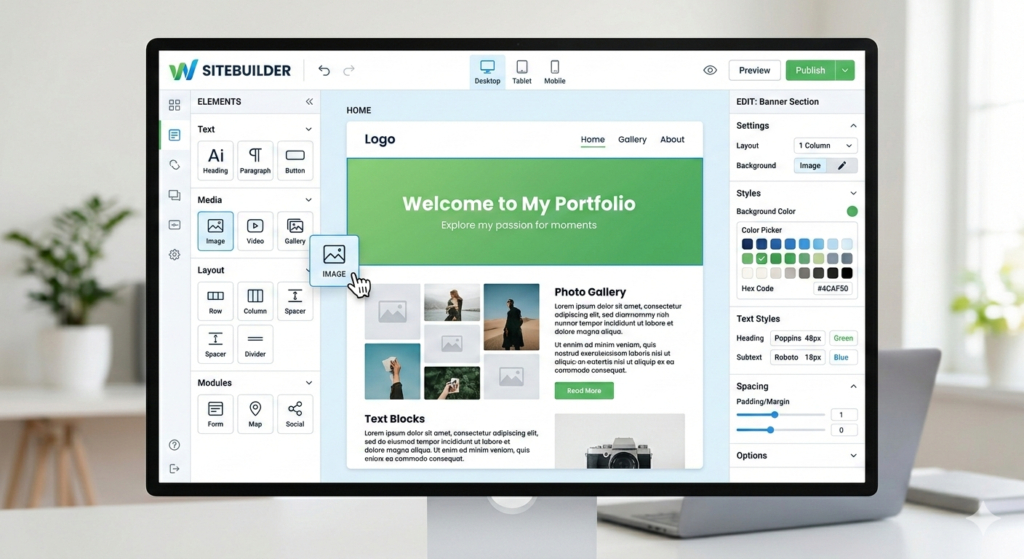
Using Drag-and-Drop Page Builders

Page builders eliminate technical complexity. They allow you to design pages visually.

Popular builders:

  • Elementor
  • Beaver Builder
  • Divi Builder

These tools allow you to:

  • Rearrange sections
  • Add images and videos
  • Customize spacing and layouts
  • Edit content in real time

Elementor’s official site: https://elementor.com/

With these tools, you can create stunning landing pages in minutes.


How to Customize Your Website Without Coding: A Beginner’s Guide to Visual Editing

Visual editing transforms the customization process. Instead of writing CSS, you click and edit.

You can:

  • Change fonts instantly
  • Adjust color palettes
  • Add background images
  • Insert call-to-action buttons
  • Modify spacing and alignment

Most platforms provide live preview functionality. This feature allows you to see changes before publishing.

It removes guesswork and boosts confidence for beginners.

Customizing Website Colors and Branding

Brand consistency builds recognition. Choose 2–4 core colors that represent your brand.

Best practices:

  • Use one primary color
  • Use a complementary secondary color
  • Keep backgrounds neutral
  • Maintain consistent button colors

Free tools like https://coolors.co/ help generate color palettes.

Typography Customization Made Simple

Fonts influence readability and personality.

Guidelines:

  • Use one font for headings
  • Use another for body text
  • Avoid more than three fonts
  • Maintain strong contrast

Google Fonts provides free options: https://fonts.google.com/

Clear typography enhances professionalism instantly.


Customizing Layouts and Sections

Most builders allow you to modify:

  • Homepage layout
  • Header structure
  • Footer design
  • Sidebar positioning
  • Section spacing

Experiment with column structures:

  • Single column for blogs
  • Two-column for content + sidebar
  • Three-column for portfolios

Always prioritize clarity and navigation ease.


Adding Functional Features with Plugins

Plugins expand functionality without coding.

Popular WordPress plugins:

  • Yoast SEO
  • WPForms
  • WooCommerce
  • Contact Form 7

Plugin directory: https://wordpress.org/plugins/

Plugins allow you to:

  • Add contact forms
  • Create online stores
  • Improve SEO
  • Enhance security

Install only necessary plugins to maintain speed.


Customizing Navigation Menus

Menus guide visitors.

Best practices:

  • Keep menus simple
  • Limit to 5–7 main items
  • Use dropdowns wisely
  • Highlight important pages

Clear navigation reduces bounce rates and improves engagement.


Optimizing Website Speed Without Code

Speed affects rankings and conversions.

Improve speed by:

  • Compressing images (https://tinypng.com/)
  • Using caching plugins
  • Choosing lightweight themes
  • Minimizing plugins

Fast websites rank better on Google and deliver better user experiences.


Mobile Customization Essentials

Over half of internet traffic comes from mobile devices.

Ensure:

  • Responsive design
  • Readable font sizes
  • Clickable buttons
  • Optimized images

Most builders allow separate mobile adjustments.

Test using Google’s Mobile-Friendly Test:
https://search.google.com/test/mobile-friendly


SEO Customization Without Coding

SEO drives traffic.

You can customize:

  • Meta titles
  • Meta descriptions
  • URL structure
  • Image alt text
  • Internal links

Yoast SEO simplifies optimization.

For deeper SEO insights and digital solutions, visit https://codinov.com/.


Using Internal and External Links Strategically

Internal links connect your pages and improve SEO.

For example:

External links build authority. Always link to trusted sources like:

Balanced linking strengthens credibility.


Common Mistakes Beginners Should Avoid

Avoid:

  • Overusing animations
  • Cluttering pages
  • Ignoring mobile users
  • Using too many fonts
  • Forgetting SEO basics

Keep your design clean and user-focused.


Frequently Asked Questions

1. Do I really need technical skills to customize a website?

No. Modern builders allow full customization visually without coding knowledge.

2. Is WordPress better than Wix for customization?

WordPress offers greater flexibility and long-term scalability.

3. Can I switch themes later?

Yes, but major layout changes may require reconfiguration.

4. How long does it take to customize a website?

Basic customization takes a few hours. Advanced styling may take a few days.

5. Will customization affect website speed?

It can if you overload plugins. Choose lightweight tools.

6. Can I optimize SEO without coding?

Yes. SEO plugins allow complete optimization without technical skills.


Conclusion: Start Customizing with Confidence Today

Learning How to Customize Your Website Without Coding: A Beginner’s Guide empowers you to take control of your digital presence. You no longer need developers to build something impressive. With the right tools, themes, and plugins, you can design a professional website that reflects your brand and drives real results.

Customization boosts credibility, enhances user experience, and improves SEO performance. Start simple, test designs, and refine gradually. Your website evolves as your business grows.

If you’re looking for expert insights, advanced digital solutions, or the best streaming services recommendations, visit https://codinov.com/ today and explore everything you need to elevate your online journey.
Hire Us Now!

Estimate Your Project & Say Hi On Mail

Your Partner for Scalable Software Solutions. We specialize in custom web development, mobile apps, and DevOps engineering. Explore case studies or request a free tech audit.

© 2025 Codinov. All Rights Reserved.

If you’ve ever wondered How to Customize Your Website Without Coding: A Beginner’s Guide, you’re in the right place. Many beginners believe that building and personalizing a website requires technical skills, programming knowledge, or expensive developers. The truth? You don’t need to write a single line of code to create a professional, beautiful, and fully functional website.

Today’s tools make it easier than ever to design, customize, and manage your website visually. Whether you’re starting a blog, launching an online store, or building a portfolio, this guide will walk you through every step in a simple and practical way.

Let’s dive in.


Why Website Customization Matters More Than Ever

A website is your digital identity. It represents your brand, values, and expertise. Visitors judge your business in seconds based on how your website looks and feels.

Customization allows you to:

  • Reflect your unique brand identity
  • Improve user experience
  • Increase engagement and conversions
  • Stand out from competitors
  • Build trust and credibility

A generic template won’t create a lasting impression. Personalization makes your website memorable.


Understanding No-Code Website Customization

No-code customization means modifying and designing your website using visual tools instead of programming languages like HTML, CSS, or JavaScript.

Modern platforms offer:

  • Drag-and-drop builders
  • Pre-designed templates
  • Visual editors
  • Customizable widgets
  • Built-in integrations

Platforms like WordPress, Wix, and Shopify allow users to build professional websites without coding knowledge.

For example, WordPress offers powerful themes and plugins that let you transform your website easily. You can explore advanced website insights and tech solutions at https://codinov.com/.


Choosing the Right Website Platform

Before customizing, you need the right foundation. Your platform determines flexibility and features.

WordPress.org

  • Highly customizable
  • Thousands of themes and plugins
  • Full control over your website
  • Ideal for blogs, businesses, and eCommerce

Official site: https://wordpress.org/

Wix

  • Drag-and-drop simplicity
  • All-in-one hosting
  • Beginner-friendly

Official site: https://www.wix.com/

Shopify

  • Best for online stores
  • Secure payment integration
  • eCommerce focused

Official site: https://www.shopify.com/

For maximum flexibility and long-term growth, WordPress remains the most powerful choice.


Selecting a Customizable Theme

Your theme controls your site’s design. Choose a responsive, fast, and flexible theme.

Look for themes that offer:

  • Mobile responsiveness
  • Custom header and footer options
  • Color and typography controls
  • Page builder compatibility

Popular WordPress themes include:

  • Astra
  • OceanWP
  • GeneratePress

You can browse them directly at https://wordpress.org/themes/.


Using Drag-and-Drop Page Builders

Page builders eliminate technical complexity. They allow you to design pages visually.

Popular builders:

  • Elementor
  • Beaver Builder
  • Divi Builder

These tools allow you to:

  • Rearrange sections
  • Add images and videos
  • Customize spacing and layouts
  • Edit content in real time

Elementor’s official site: https://elementor.com/

With these tools, you can create stunning landing pages in minutes.


How to Customize Your Website Without Coding: A Beginner’s Guide to Visual Editing

Visual editing transforms the customization process. Instead of writing CSS, you click and edit.

You can:

  • Change fonts instantly
  • Adjust color palettes
  • Add background images
  • Insert call-to-action buttons
  • Modify spacing and alignment

Most platforms provide live preview functionality. This feature allows you to see changes before publishing.

It removes guesswork and boosts confidence for beginners.

Customizing Website Colors and Branding

Brand consistency builds recognition. Choose 2–4 core colors that represent your brand.

Best practices:

  • Use one primary color
  • Use a complementary secondary color
  • Keep backgrounds neutral
  • Maintain consistent button colors

Free tools like https://coolors.co/ help generate color palettes.

Typography Customization Made Simple

Fonts influence readability and personality.

Guidelines:

  • Use one font for headings
  • Use another for body text
  • Avoid more than three fonts
  • Maintain strong contrast

Google Fonts provides free options: https://fonts.google.com/

Clear typography enhances professionalism instantly.


Customizing Layouts and Sections

Most builders allow you to modify:

  • Homepage layout
  • Header structure
  • Footer design
  • Sidebar positioning
  • Section spacing

Experiment with column structures:

  • Single column for blogs
  • Two-column for content + sidebar
  • Three-column for portfolios

Always prioritize clarity and navigation ease.


Adding Functional Features with Plugins

Plugins expand functionality without coding.

Popular WordPress plugins:

  • Yoast SEO
  • WPForms
  • WooCommerce
  • Contact Form 7

Plugin directory: https://wordpress.org/plugins/

Plugins allow you to:

  • Add contact forms
  • Create online stores
  • Improve SEO
  • Enhance security

Install only necessary plugins to maintain speed.


Customizing Navigation Menus

Menus guide visitors.

Best practices:

  • Keep menus simple
  • Limit to 5–7 main items
  • Use dropdowns wisely
  • Highlight important pages

Clear navigation reduces bounce rates and improves engagement.


Optimizing Website Speed Without Code

Speed affects rankings and conversions.

Improve speed by:

  • Compressing images (https://tinypng.com/)
  • Using caching plugins
  • Choosing lightweight themes
  • Minimizing plugins

Fast websites rank better on Google and deliver better user experiences.


Mobile Customization Essentials

Over half of internet traffic comes from mobile devices.

Ensure:

  • Responsive design
  • Readable font sizes
  • Clickable buttons
  • Optimized images

Most builders allow separate mobile adjustments.

Test using Google’s Mobile-Friendly Test:
https://search.google.com/test/mobile-friendly


SEO Customization Without Coding

SEO drives traffic.

You can customize:

  • Meta titles
  • Meta descriptions
  • URL structure
  • Image alt text
  • Internal links

Yoast SEO simplifies optimization.

For deeper SEO insights and digital solutions, visit https://codinov.com/.


Using Internal and External Links Strategically

Internal links connect your pages and improve SEO.

For example:

External links build authority. Always link to trusted sources like:

Balanced linking strengthens credibility.


Common Mistakes Beginners Should Avoid

Avoid:

  • Overusing animations
  • Cluttering pages
  • Ignoring mobile users
  • Using too many fonts
  • Forgetting SEO basics

Keep your design clean and user-focused.


Frequently Asked Questions

1. Do I really need technical skills to customize a website?

No. Modern builders allow full customization visually without coding knowledge.

2. Is WordPress better than Wix for customization?

WordPress offers greater flexibility and long-term scalability.

3. Can I switch themes later?

Yes, but major layout changes may require reconfiguration.

4. How long does it take to customize a website?

Basic customization takes a few hours. Advanced styling may take a few days.

5. Will customization affect website speed?

It can if you overload plugins. Choose lightweight tools.

6. Can I optimize SEO without coding?

Yes. SEO plugins allow complete optimization without technical skills.


Conclusion: Start Customizing with Confidence Today

Learning How to Customize Your Website Without Coding: A Beginner’s Guide empowers you to take control of your digital presence. You no longer need developers to build something impressive. With the right tools, themes, and plugins, you can design a professional website that reflects your brand and drives real results.

Customization boosts credibility, enhances user experience, and improves SEO performance. Start simple, test designs, and refine gradually. Your website evolves as your business grows.

If you’re looking for expert insights, advanced digital solutions, or the best streaming services recommendations, visit https://codinov.com/ today and explore everything you need to elevate your online journey.